Group Policy Object (GPO)
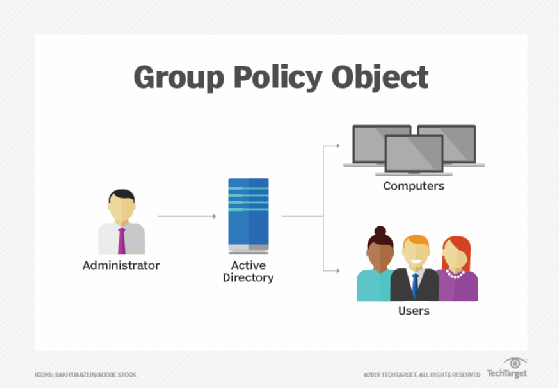
Microsoft’s Group Policy Object (GPO) is a collection of Group Policy settings that defines what a system will look like and how it will behave for a defined group of users.
Microsoft provides a program snap-in that allows you to use the Group Policy Management Console (GPMC). The selections result in a Group Policy Object. The GPO is associated with selected Active Directory containers, such as sites, domains or organizational units (OU). The GPMC allows you to create a GPO that defines registry-based polices, security options, software installation and maintenance options, scripts options and folder redirection options.
Types of GPOs
There are three types of GPOs: local, non-local and starter.
- Local Group Policy Objects. A local Group Policy Objectrefers to the collection of group policy settings that only apply to the local computer and to the users who log on to that computer. Local GPOs are used when policy settings need to apply to a single Windows computer or user. Local GPOs exist by default on all Windows computers.
- Non-local Group Policy Objects. A non-local group policy objectis used when policy settings have to apply to one or more Windows computers or users. Non-local GPOs apply to Windows computers or users once they’re linked to Active Directory objects, such as sites, domains or organizational units.
- Starter Group Policy Objects. Introduced in Windows Server 2008, starter GPOs are templates for Group Policy settings. These objects enable an administrator to create and have a pre-configured group of settings that represent a baseline for any future policy to be created.
Data Security and Group Policy Object
There are some Group Policy settings that can help secure a company’s network. For example, through Group Policy, an organization can run scripts, stop users from accessing certain resources and perform simple tasks, such as forcing a particular home page to open for every network user.
Some of these security measures include:
- Limiting access to Control Panel -- through Control Panel, a company can control all aspects of a computer. Limiting who has access to a computer enables organizations to keep data and other resources safe.
- Disabling Command Prompt -- A company can use Command Prompts to run commands that give high-level access to users and bypass other system restrictions. That’s why it’s prudent to disable Command Prompt to ensure the security of system resources. If a user tries to open a command window after Command Prompt has been disabled, the system will display a message indicating that some settings are preventing this.
- Prevent software installations -- if users are allowed to install software, they may install unwanted applications or malware that can compromise a company’s system. As such, it’s better to prevent software installations through Group Policy.
Benefits of Group Policy Objects
There are several benefits to implementing GPOs in addition to security, including:
- More efficient management -- GPOs already in place apply a standardized environment to all new users and computers that join an organization’s domain, saving time on setup.
- Ease of administration -- system administrators can deploy software, patches and other updates via GPO.
- Better password policy enforcement -- GPOs determine password length, reuse rules and establish other requirements for passwords to keep a company’s network safe.
- Configuring folder redirection -- GPOs enable companies to ensure users are keeping important company files on a centralized and monitored storage system. For instance, an organization can redirect a user’s Documents folder, which is usually stored on a local drive, to a network location.
Limitations of GPOs
The limitations of Group Policy Objects include:
- They run sequentially -- GPOs process actions one after another. Consequently, if many GPOs have to be configured, it can take a long time for users to log on.
- Flexibility is limited -- GPOs can only be applied to users or computers. So they’re limited when it comes to applying settings based on context.
- Limited triggers -- GPOs can only be applied at computer startup, when a user logs on or at set intervals. GPOs can’t react to changes in environment, such as network disconnect or reconnect.
- Difficult to maintain -- there’s no built-in search or filter option to find a specific setting within a GPO, making it difficult to find or fix issues with existing settings.
- No Version control -- changes made to GPO settings aren’t audited. So if an incorrect change is made, it’s impossible to tell what the change was or who made it.
Processing order of GPOs
The processing order of Group Policies effects what settings are applied to the computer or end-user. This processing order is known as LSDOU: local, site, domain, organization unit. First the local computer policy is processed, followed by Active Directory policies from site level to domain, then into OU (GPOs in nested organizational units apply from the OU closest to the root first, and continues from there). If there are any conflicts, the last applied policy will take effect.
Examples of GPOs
The following are examples of Group Policy Objects:
- A GPO might specify the home page that’s first displayed when a user launches Internet Explorer. When the user logs on to the domain, that group policy object is retrieved and applied to the configuration of the user’s Internet Explorer.
- An organization can deploy shared network printer connections to users from a specific OU of Active Directory by using Group Policy. So when a user logs in to Windows, an assigned network printer will automatically appear in the list of available printers.
- Admins can use a group policy to adjust settings, such as turning off computer displays are a certain period of time, choosing default programs and preventing users from changing Internet connection options.
Best practices
Some best practices for GPOs include:
- Create a well-designed organizational unit structure in Active Directory to simplify applying and troubleshooting Group Policy.
- Give GPOs descriptive names to enable admins to quickly identify what each GPO does.
- Add comments to each GPO explaining why it was created, what its purpose is and what its settings are.
- Don’t set GPOs at the domain level because they’ll be applied to all computer and user objects. That could cause some settings to be applied to some objects unnecessarily.
- Don’t use the root computers or user folders in Active Directory because they’re not organizational units and they can’t have GPOs linked to them. When a new user or computer object appears in these folders, it should be immediately to the appropriate OU.
- Don’t disable a GPO. Rather, delete the link from an OU instead of disabling the GPO if you don’t want it to be applied. Disabling the GPO will prevent it from being applied entirely on the domain. That could be a problem because if that particular Group Policy is used in another OU, it won’t work there any longer.