What is unified endpoint management (UEM)? A complete guide
Unified endpoint management (UEM) is an approach to securing and controlling desktop computers, laptops, smartphones and tablets in a connected, cohesive manner from a single console. Unified endpoint management typically relies on the mobile device management (MDM) application performance indicators (APIs) in desktop and mobile operating systems.
Capabilities and advantages of UEM
Several vendors offer UEM products, and the capabilities vary from one offering to the next. Some common UEM capabilities include the following:
- A single pane of glass interface for managing desktop and mobile devices.
- Ability to push updates to devices.
- Ability to apply security policies to managed devices.
- A remote wipe feature that can remove all applications and data from a lost or stolen device.
- A portal that allows bring your own device (BYOD) users to enroll their own devices.
- Application management capabilities. Depending on the product, an administrator might push enterprise applications to managed devices or provide authorized users access to an enterprise app store where they can download applications independently.
In addition, some of the third-party UEM products include tools that track end-user activity or detect and remediate security issues. Some vendors are even augmenting their tools with machine learning and artificial intelligence (AI) engines that help to improve data security and mobile content management.
UEM vs. EMM vs. MDM
With several device management tools available, new customers must understand the differences between UEM, MDM and EMM to find which is right for them. Here's how UEM compares to the other terms:
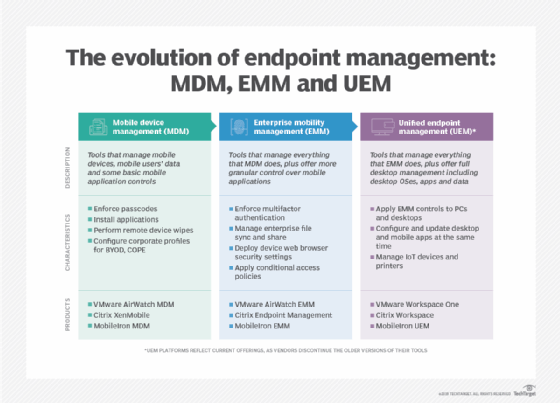
- Mobile device management (MDM). A decade ago, many freestanding products focused on managing mobile devices via MDM APIs and protocols, creating several benefits for organizations. Today, support for MDM is one of many functions in a UEM platform.
- Mobile application management (MAM). Like MDM, freestanding MAM products were once common but are now mostly found as a component of UEM.
- Enterprise mobility management (EMM). Before UEM became the dominant endpoint management tool, consolidation and product updates resulted in EMM platforms that included MDM and MAM functionality. When EMM platforms began supporting macOS, Windows and other devices, industry trends again changed quickly, and unified endpoint management became the common term.
UEM features and components
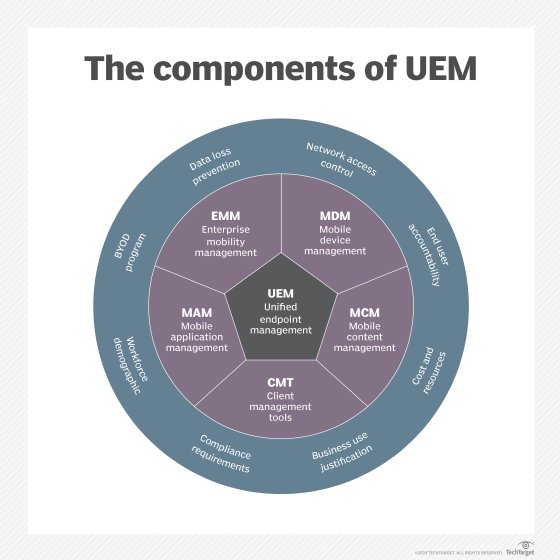
Unified endpoint management platforms encompass several components.
Device management
The primary component of UEM is device management, connecting devices to the service via an MDM protocol. MDM protocols allow the service to interact remotely with a device, sending it configurations, commands and queries. There's no need for a device to be on a corporate network or VPN, because MDM protocols work over the internet.
Device management tasks include the following:
- Configuring encryption.
- Setting passcode policies.
- Managing OS and app updates.
- Configuring Wi-Fi and VPN connections.
- Configuring email and other accounts.
- Device location tracking.
- Remote lock, unlock and wiping of the device.
- Configuring data loss prevention (DLP) settings.
OS and device support
UEM often focuses on mobile devices, but most offerings support multiple types of clients.
Apple's MDM protocol supports Apple iOS devices, which don't require an agent. IOS management involves several cloud services from Apple -- including the Apple Push Notification service, Apple Business Manager and Apple School Manager for purchasing apps, managing Apple IDs and enrolling devices in bulk. Apple MDM has several different modes for different scenarios, including User Enrollment mode for BYOD, Device Enrollment, Automated Device Enrollment and Supervised mode for corporate devices. Apple has expanded its MDM protocol to cover macOS, iPadOS, watchOS and tvOS devices.
In the past, Android management was fragmented. Today, the Android Enterprise management framework -- which emerged in Android 5.0 and is now included in almost every Android device -- is quite extensive. Android Enterprise has management modes for dedicated kiosk devices, corporate devices and devices with mixed work and personal usage via work profiles.
UEM can also manage several other types of devices:
- Chromebooks and Chrome OS devices connect to a proprietary cloud service offered by Google, but several UEM platforms integrate with Google, using it as a middleware service.
- Many ruggedized devices -- wearable devices, such as smart glasses and virtual reality (VR) or augmented reality (AR) goggles -- run Android OS or inherit management capabilities from paired smartphones. Managing these devices is possible with some UEM products.
- Some UEM platforms also manage or integrate with virtual desktops.
Deployment and enrollment
Traditional client deployment involves a labor-intensive process of device imaging, but MDM protocols and UEM platforms offer a much more convenient approach.
IT teams can manually enroll Apple iOS, Android, macOS and Windows 11 devices through the user interface, but these OSes also offer new automatic enrollment and provisioning processes. Examples include Apple Automated Device Enrollment, Windows Autopilot and Android zero-touch enrollment.
When almost any modern device powers on for the first time, it will check in with a cloud service. If it's a corporate device, it can redirect to the appropriate UEM platform to enroll and configure it automatically. Since there's no need for IT staff to perform a traditional imaging process, OEMs can ship devices directly to end users.
BYOD and privacy
In many organizations, the first iOS and Android devices were often personally owned devices that users purchased independently and then wanted to use for work. This resulted in corporate data and apps existing on the same device as personal apps and data, which brought unprecedented security and privacy challenges. Many components of UEM platforms exist and have evolved over the years specifically to deal with BYOD and privacy.
Many IT departments realized they couldn't treat a personal device like a corporate one, with a blanket of locked-down policies. Instead, they introduced MAM to apply corporate policies to specific apps and data while leaving others alone. This can happen using specialized applications that connect directly to the UEM server, even if the device is not enrolled, or via operating systems that separate work from personal features.
UEM platforms can also limit administrator roles so admins cannot see or do anything to affect the personal side of a device, or platforms may have roles dedicated specifically to privacy auditing and control.
Some UEM vendors provide end user-facing resources that explain what their company can and can't do. For example, no MDM protocol allows a UEM server to read personal text messages or personal emails or see private photos.
Mobile app management
MDM protocols can enable UEM services to install apps on devices and manage settings within the apps if they are exposed using app configuration standards. MDM protocols also have features that can define how corporate apps interact with personally installed apps, such as file-sharing controls and per-app VPNs.
When devices aren't enrolled in MDM -- for example, devices used by contract employees or partners -- UEM platforms can treat an app as the endpoint and build management features into the application. Encryption, passcode challenges, remote wipe, DLP controls, settings configuration, VPNs and other features can all be integrated directly into the code of an app.
However, IT must custom build these types of apps, so only the apps they develop for non-MDM enrolled devices will have these features. UEM vendors generally provide basic apps like email clients and browsers, and they offer SDKs and app wrapping tools for customers and independent software vendors that want to create their own apps that are compatible with a particular UEM platform.
UEM platforms generally provide a repository for organizations to host their in-house apps, or they can direct devices to install apps hosted in public app stores. For end users, UEM platforms provide an application catalog so they can install apps via self-service. Some of these app catalogs have evolved into complete digital workspace offerings, with links to launch web and mobile apps with single sign-on (SSO), integration with remote desktop clients and other features, such as micro apps, content repositories, company directories and virtual assistants.
Identity and access management
The usage of SaaS apps rose concurrently with the spread of mobile devices. Just as UEM arose to deal with mobility, so did new cloud-based identity and access management (IAM) products and standards. Many SaaS apps use standards such as Security Assertion Markup Language and OAuth to federate user identities and provide SSO.
Since then, UEM and IAM have gone hand in hand, and some UEM platforms even provide their own identity provider functionality.
There are many ways that UEM and identity management can work together, whether they're part of the same platform or separate products. UEM can distribute certificates to mobile devices, which then can be used to authenticate to an identity provider. This ensures that only devices enrolled in UEM can access enterprise apps. Since entering passwords on a small screen can be challenging, SSO is especially important for providing a pleasing and secure user experience on mobile devices.
UEM can provide additional context for access and authentication decisions. For example, a conditional access policy may consider the device location, management status, patching status and other signals from the UEM when deciding whether to grant access, ask for additional authentication factors, block access or take other actions.
Security
Mobile operating systems have very different security models than traditional desktop operating systems. Mobile devices are always connected to the internet and can easily be lost.
Mobile OSes are sandboxed, so apps only interact with each other and the OS in a very limited and supervised way, with user-controlled permissions protecting sensitive data. Mobile apps must be verified and generally come from curated app stores with security reviews and mechanisms for revoking apps.
A significant proportion of mobile security tasks is a matter of monitoring and configuring devices via MDM. For example, is the device free of sideloaded applications? Is it patched and encrypted? Are enterprise apps configured to connect via a VPN? Are proper DLP restrictions in place? IT can also remotely lock or erase devices using over-the-air technology.
This is not to say that mobile devices are completely secure. Just like any operating system, there are vulnerabilities that IT admins must patch. In particular, organizations also worry about phishing, social engineering and other identity and authentication issues on mobile devices.
Mobile threat defense (MTD) products have emerged to augment UEM. MTD tools generally cover four areas: device integrity, which includes jailbreak and root detection; network security to prevent man-in-the-middle attacks; mobile app reputation service; and phishing prevention.
Phishing prevention is especially important because many visual cues that help users spot phishing attacks are obscured on mobile devices, and mobile chat apps generally don't run through filtering systems as enterprise emails do.
MTD can deploy to devices as a freestanding agent or via an SDK integrated into other apps. MTD deployments benefit greatly from UEM integration, as UEM platforms can provide more visibility than agent apps alone and offer multiple ways to remediate threats.
UEM and artificial intelligence
Many security and management products have been marketing artificial intelligence and machine learning features, and UEM is no exception. AI and machine learning can augment UEM products in a variety of ways. Depending on the application, vendors may train AI and machine learning models using data from their entire customer base, from a single customer or from a single user.
AI and machine learning can recommend device management policies and spot configuration anomalies, so administrators don't have to create policies manually. For security purposes, AI and machine learning can identify an anomalous device, user or application behavior and configurations and then alert IT to any issues. This is especially common in access management flows, where the technology can adjust authentication requirements.
For end users, AI and machine learning often appear in the form of natural language processing and chatbots. For example, a user could request to enroll a new device, install an application or even access help desk resources via interfaces in UEM products.
UEM software vendors
A few very broad UEM products receive the most attention in the industry, but a wide variety of vendors still support various combinations of MDM APIs and protocols, security, mobile app management, client management and other related features.
These vendors provide the broadest UEM offerings:
- Microsoft. Microsoft Intune is a cloud-based UEM platform that focuses on support for extensive endpoint types -- including specialty devices such as AR/VR headsets -- analytics and security. The licensing options are extensive, and Microsoft takes advantage of sales of Windows and Office 365 to get it in front of as many customers as possible.
- VMware. VMware acquired EMM vendor AirWatch in 2014 and sells its broad UEM platform under the Workspace One brand. Workspace One has integrations for security, identity management, micro apps and desktop virtualization.
- Ivanti. Ivanti acquired MobileIron, and its UEM tools, in 2020. Ivanti Neurons for UEM is a cloud-based tool that spotlights its support for device lifecycle management and AI-powered tools for security and task optimization. Notably, Ivanti has several UEM products, including Ivanti Neurons for UEM, Ivanti UEM for Clients, Ivanti UEM for Mobile and several other options.
- Citrix. Desktop virtualization vendor Citrix acquired EMM vendor Zenprise in 2013 and micro-app platform Sapho in 2018. Citrix Endpoint Management enables organizations to manage the top OS platforms and is ideal for organizations already using a Citrix portfolio.
- BlackBerry. BlackBerry began offering support for iOS and Android management in 2012 and became a player in the UEM market by acquiring Good Technology in 2015. BlackBerry has transitioned from a hardware vendor to a software vendor focusing on security.
- IBM. IBM's UEM tool is MaaS360, which IBM acquired from Fiberlink Communications in 2013. MaaS360 benefits from IBM's broad portfolio of related products, including identity management, cloud access security brokering and mobile threat defense. MaaS360 has also integrated administrator and end user-facing artificial intelligence features from IBM Watson.
Choosing the right UEM product
Unified endpoint management is a "sticky" product: Once devices are enrolled, it's difficult to unenroll them and connect to a different product without manual, in-person support. Therefore, choosing a UEM product is an important decision.
Customers should consider the following questions:
- Does the product support all the operating systems and deployment models that the organization uses, such as BYOD, ruggedized or corporate?
- Will the product support future deployment scenarios such as IoT devices, Linux, macOS or Windows 11?
- Besides endpoint management, what other services -- such as app catalogs, browsers, email clients, productivity apps or micro apps -- does the product offer?
- Does the UEM tool integrate with the appropriate identity and security products? Or what bundled security and identity features are available? Do they provide timely support for new iOS and Android versions?
- Does the product integrate well with the existing on-premises architecture, or will organizations need to invest in a cloud-based UEM platform?
Like any software buying decision, customers must consider whether the vendor can meet their desired service-level agreement and regulatory certification requirements and whether the vendor has an established relationship and trust with the customer. Finally, customers should consider the vendor's approach to BYOD, privacy and user experience.
UEM deployment strategy
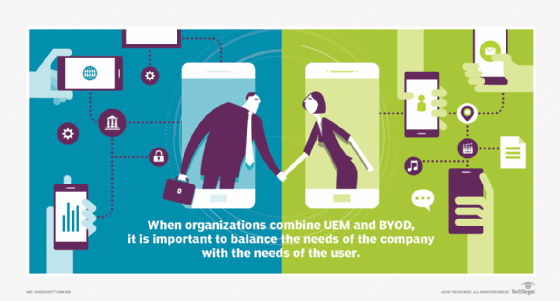
Like any project, deploying UEM requires careful planning. But IT must take extra care when end users, BYOD and personal privacy are involved. Organizations must inform users what the company can and cannot do and see on their personal devices. IT departments must be aware that many decisions about BYOD policies are not theirs; they must also consult human resources and legal departments.
Device enrollment is often one of the most challenging aspects of a UEM deployment. Automatic device enrollment can save significant labor but requires coordination between the UEM platform and the device reseller. Getting end users to enroll devices requires training programs. Even then, achieving compliance can be a challenge.
When expanding UEM to Windows and macOS, a whole new set of challenges arises. Companies must decide how they will translate traditional client management policies to MDM policies, while possibly adopting a new device management platform.
IT must take precautions when migrating devices from one product to another. Since this process generally involves unenrolling and re-enrolling devices, several products on the market keep track of devices during the transition.
A UEM deployment is not a single project; it is constantly changing. Apple iOS, Android and other operating systems change yearly, with new MDM APIs and new features for the enterprise to manage. In addition, users' attitudes towards BYOD change over time, and new generations of employees may have different feelings about enterprise management on personal devices.
History and evolution of UEM
Shortly after the arrival of smartphones, products arose to integrate them into the enterprise. Good for Enterprise and Nitrodesk TouchDown provided early enterprise email clients and MAM, and iOS 4 and Android 2.2 introduced MDM APIs that could be used for remote management by an MDM server.
The first modern MDM products were generally separate from traditional client management tools, which focused on PC management. Later, vendors started to consolidate MDM and MAM into a single platform, and the collective term for products in the industry shifted from MDM to EMM. EMM products included support for managing devices via MDM APIs, as well as protocols and support for managing apps.
As the EMM market matured, it transformed into UEM. UEM tools, combining traditional client management with EMM, emerged via several approaches.
Some client management tools added support for mobile devices via MDM protocols. In other cases, vendors took existing client management platforms and EMM platforms and found ways to link them together, providing a degree of common visibility over both halves.
At the same time, desktop operating systems started adding remote management support via their MDM APIs and protocols. This made it easier for UEM platforms to start supporting desktops, as it was simply a matter of adding more flavors of MDM for different devices. In time, these products also incorporated more elements of traditional client management.
UEM platforms continue to develop, largely by integrating with even more software categories. This can include endpoint security products, IAM, performance monitoring and productivity tools such as enterprise file sync and share and chat apps.