port

What is a computer port?
A port in computing has three main uses, each as a type of receptacle in networking, computer hardware and software:
- A port in networking is a software-defined number associated to a network protocol that receives or transmits communication for a specific service.
- A port in computer hardware is a jack or socket that peripheral hardware plugs into.
- A port in computer software is when a piece of software has been translated or converted to run on different hardware or operating system (OS) than it was originally designed for.
What is a computer network port?
A port in computer networking is how a computer can use a single physical network connection to handle many incoming and outgoing requests by assigning a port number to each. The numbers go from 0 to 65535, which is a 16-bit number.
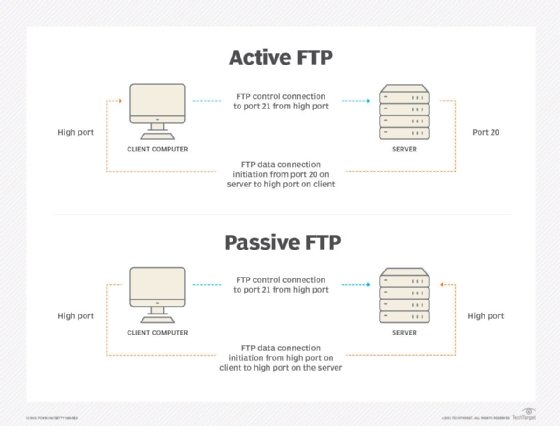
Some of these port numbers are specifically defined and always associated with a specific type of service -- for example, File Transfer Protocol (FTP) is always port number 21 and Hypertext Transfer Protocol web traffic is always port 80. These are called well-known ports and go from 0 to 1023.
The numbers from 1024 to 49151 are called registered ports and can be registered with the Internet Assigned Numbers Authority for a specific use. The numbers 49152 to 65535 are unassigned, can be used by any type of service and are called dynamic ports, private ports or ephemeral ports.
As an illustration, think of a port number as a telephone extension in a business telephone system. The company telephone number is like the computer Internet Protocol (IP) address or Uniform Resource Locator (URL). It connects users with the correct company but does not define who they want to talk to in the company. A telephone extension will connect them with the right person in an organization, however, and the port will connect them to the right service on a computer. Dialing extension 0 to speak to an operator is extremely common in all phone systems and is like the well-known ports that always define specific services.
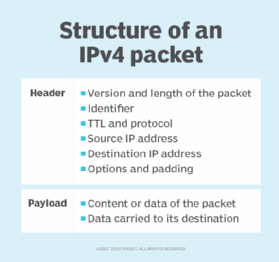
A port is always associated with a protocol. Generally, this is with Transmission Control Protocol or User Datagram Protocol for communication, but Internet Control Message Protocol messages use specific ports as well. The port is specified by having the URL or IP address followed by a colon then the port number -- as examples, 10.0.0.1:80 or www.techtarget.com:443. With all internet communication, there is always an associated port, but it may not be shown to the user as it is often implied by the type of communication.
A computer can manage many simultaneous connections on a single inbound port. This is because the local IP address, local port, remote IP address and remote port specify each connection. A listening port is when the computer is actively waiting for inbound requests on that port number, allowing those connections. Port forwarding is when communication to one address on a specific port is then sent, or forwarded, to another computer for processing.
How do network ports affect cybersecurity?
Network ports are a major factor in network security and cybersecurity in general.
Port scanning, for example, tries all ports at an address to see which ones are open and listening. Attackers can use this to find vulnerable services that they can then attack.
Firewalls take the port number into consideration when determining to allow or block communication. They are configured to only allow communication to the specific ports needed for a service and block other unneeded ports so they cannot be exploited.
As an example of ports in use, say a company wants to have a website, email and secure file transfer service on the internet. Its firewall would allow inbound connections to ports 80 and 443 for web traffic, port 25 for inbound email and port 22 for Secure Shell FTP (SFTP). It forwards these ports to the specific servers for each type of service. The firewall will block all other ports.
So, if an employee incorrectly tries to use FTP on port 21 instead of SFTP, it will be blocked. Or, for instance, if an attacker tries to connect to port 3389 for Windows Remote Desktop to gain control of a server, the firewall will block the connection.
What is a computer hardware port?
In computer hardware, a port is the jack or receptacle for some other peripheral device to plug into. These are standardized for each purpose.
Some common ports are Universal Serial Bus ports, USB-C ports, Ethernet ports or DisplayPorts. Some older ports no longer in common use are serial ports, parallel ports and mouse/keyboard PS/2 ports. As a general guideline, if the plug receptacle is on a computer, it is called a port; if the receptacle is on a wall, it is called a jack.
What is a computer software port?
In computer software, the verb porting is the process by which software is changed or translated to run on different hardware types or OSes than it was originally programmed for. The result can be called a port of the software.
Examples of this include the following:
- Microsoft originally programmed Windows 10 to run on X86 processors but is now porting Windows to also run on Arm processors.
- Microsoft programmed Office to run on Windows OSes, but a port of Office is also available for macOS.
- Porting games originally designed to run on one video game console to run on another type of console is also common.