Using Sysinternals tools in security management scenarios
Discover three valuable Sysinternals tools and common Windows security management scenarios in which these tools would be used.

By now most Windows shops understand how using Sysinternals tools can help streamline daily management tasks. To further demonstrate the power and benefits of these tools, let's explore three security management scenarios you're likely to come across when administering Windows systems, and show how Sysinternals can work for you.
- Scanning for open network shares that users have haphazardly enabled
- Monitoring system activity during a suspected intrusion or malware infection
- Analyzing TCP sessions to determine who's talking to what and vice versa
Be forewarned that you shouldn't jump in head first with Sysinternals tools. I suggest you read the documentation that comes with each tool and proceed with cautious enthusiasm. These tools are not for the faint of heart. They aren't difficult to use, but you may end up making Windows do more than you intended and crash your system or lose important data.
Scenario 1: Scanning for open network shares that users have haphazardly enabled
I've noticed that users often take advantage of the power of networked computers and file sharing. While this function can serve a legitimate purpose, it can be easily exploited by users with malicious intent. By using the ShareEnum tool, you can put a stop to this unnecessary sharing out of directories and files to those who don't need access. Proceed as follows:
- Load the program
-
- Enter an IP address range or Windows domain to scan
-
- Click "refresh"
This tool will uncover open shares that everyone and every group has access to, similar to my findings in Figure 1.
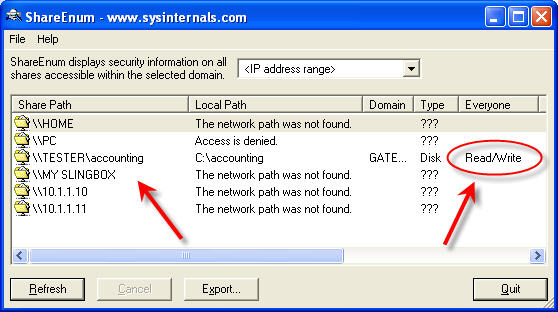
Figure 1 Using Sysinternals' ShareEnum to enumerate open and exposed network shares. (Click on image for enlarged view.)
Armed with this information, you can revoke unnecessary rights and lock down your sensitive files. If you would like to check access rights to directories, files or even registry keys on a specific system, then check out the similar AccessEnum tool.
Has someone or something compromised one of your Windows systems and you want to see the activity under the hood? Formal forensics methodologies aside, you can download and run Sysinternals Process Monitor, which shows you anything and everything taking place on Windows systems from registry access to file writes to network connections and beyond as shown in Figure 2.
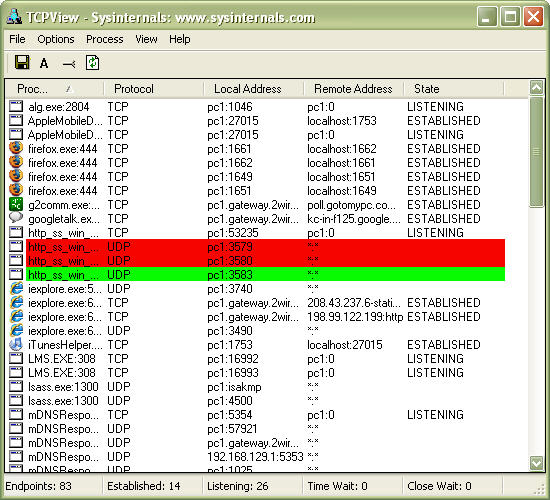
Figure 2 Using Sysinternals' ProcessMonitor shows exactly what's going on in Windows at any given time. (Click on image for enlarged view.)
With its filtering and logging capabilities, as well as process tree exploration (similar to that in Process Explorer), Process Monitor allows you to do things that typically only very advanced people would dare to try or advanced tools would allow. The best part: Process Monitor is free. After running Process Monitor and experiencing first-hand the benefits this tool provides, you'll understand why Microsoft acquired Sysinternals.
 |
||||
|
|
|||
|
||||
Let's say you have a system acting up, transmitting and receiving a lot of network packets but you don't know where they're headed or coming from. You may also be curious about what application or process is generating the traffic. This would be a perfect scenario in which the Sysinternals TCPView tool would be useful. As shown in Figure 3, TCPView can drill down to help you monitor and troubleshoot both TCP and UDP connections in a happy-clicky-GUI fashion without having to do it the archaic way by using netstat –an from a command line.
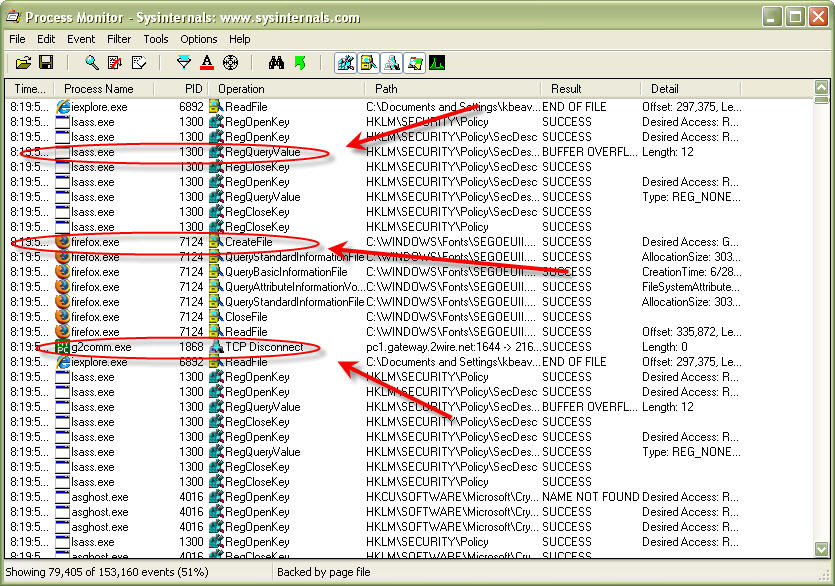
Figure 3 Using Systinternals' TCPView to analyze Windows-based network communications. (Click on image for enlarged view.)
The possibilities for using the Sysinternals tools are unlimited, so check out what Microsoft has to offer in this gem of a toolset. The tools mentioned in this tip are, most often, my personal choice in security-related scenarios. However, you won't want to overlook the value of PsTools and the utility of BgInfo. (On a side note: The humor of BlueScreen -- what a clever prank for April Fools' Day. We've got to have fun to take the edge off, right?)
| About the author: |
 Kevin Beaver Kevin BeaverKevin Beaver is an information security consultant, keynote speaker, and expert witness with Atlanta-based Principle Logic, LLC. Kevin specializes in performing independent security assessments. Kevin has authored/co-authored seven books on information security including Hacking For Dummies and Hacking Wireless Networks For Dummies (Wiley). He's also the creator of the Security On Wheels information security audio books and blog providing security learning for IT professionals on the go. Kevin can be reached at kbeaver /at/ principlelogic.com. |