Desktop security is crucial, and the default settings of Windows 10 can leave organizations vulnerable. Here are a few changes to ensure that Windows 10 is as secure as possible.
The task of securing desktops is a never-ending one, but IT can start by making a few changes to Windows 10 security settings.
Windows 10 has some great security enhancements, such as Windows Defender and some kernel improvements. If IT pros don't apply a security baseline, however, they risk making their organizations vulnerable to security risks.
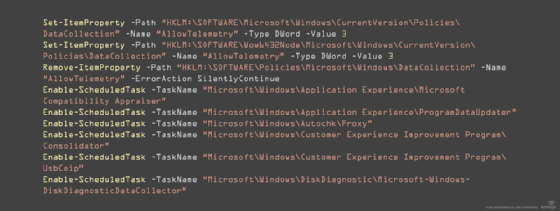
Disable telemetry
Microsoft built Windows 10 with numerous telemetry features. With the current state of privacy computing issues, most organizations want to turn off telemetry and for good reason.
On the surface, telemetry is not a bad thing. Microsoft wants to collect diagnostic and feedback data and send it back to developers to make Windows more stable and secure. But it's difficult to determine exactly what Microsoft is collecting and what it is doing with that information.
To disable telemetry in the registry, IT can use PowerShell.
Disable remote desktop
End users won't likely need to connect remotely to their desktops anyway, so IT should disable RDP by default.
Allowing remote desktop connections is often a security hole. The Remote Desktop Protocol (RDP) can be hacked relatively easily, especially if IT doesn't set proper security with a certificate authority. End users won't likely need to connect remotely to their desktops anyway, so IT should disable RDP by default.
IT can turn this off via two avenues: the Windows firewall and the registry. To disable RDP with PowerShell, IT can run the following command:
There are many ways to configure whitelisting on Windows desktops, but it can quickly become complex and hard to maintain. One method is to ensure that executables and dynamic link libraries are only allowed to run in the Program Files folder and in the %WINDIR% directory.
IT can get deeper and exclude certain directories, such as the %TEMP% directory, within these locations as well, but this will at least ensure that executables do not run in a user's profile directory.
Use multi-factor authentication
IT should enable multifactor authentication (MFA) to enhance Windows 10 security settings. Although MFA has vulnerabilities itself, it can also block many security issues, such as phishing and man-in-the-middle attacks.
One product that can help IT implement MFA is Duo Security, which IT can install on multiple OSes. The tool operates MFA through many different applications, such as WordPress, Azure and Dropbox.
IT can also install Duo as a Windows application on a desktop to ensure that users logging on to the desktop have to authenticate with MFA before they gain access.
Disable unnecessary services
Organizations may want to disable certain services from running if they are not using them for a specific reason. For example, the remote registry service allows IT administrators to connect remotely to desktops to view and modify a computer's registry. IT should disable this service and only enable it when necessary.
To disable the remote registry service, simply use Set-Service in PowerShell:
Windows 10 Enterprise automatically preinstalls the Xbox app. These services will not start automatically on boot, but IT should still disable them to improve Windows 10 security settings. To do so in PowerShell, IT can use a wildcard for any service starting with Xbox and piping to Set-Service: