Windows
What is Microsoft Windows?
Windows is Microsoft's flagship operating system (OS), the de facto standard for home and business computers.
The graphical user interface (GUI)-based OS was introduced in 1985 and has been released in many versions since then, as described below.
Microsoft got its start with the partnership of Bill Gates and Paul Allen in 1975. Gates and Allen co-developed Xenix (a version of Unix) and also collaborated on a BASIC interpreter for the Altair 8800. The company was incorporated in 1981.
In addition to the Windows OS, Microsoft develops and sells gaming systems such as the new Xbox Series X and a line of PC, laptop and notebook devices, including the Surface Pro.
History and development of Microsoft and Windows
Microsoft gained prominence in the tech field with the release of MS-DOS, a text-based command-line-driven OS. DOS was mostly based on purchased intellectual property, QDOS. GUI-based OSes of that time included Xerox's Alto, released in 1979, and Apple's LISA and Macintosh systems, which came later. Die-hard fans of MS-DOS referred to such systems as WIMPs, which stood for "windows, icons, mouse and pull-down menus (or pointers)."
However, Gates saw the potential in GUI-based systems and started a project he called Interface Manager. Gates thought he could bring the GUI to a wider audience at a lower cost than the $9,000 LISA. The rest of Microsoft supported this idea, and, in a somewhat ironic move, the project team selected "Windows" as the name of the new OS.
Microsoft announced the impending release of Windows 1.0, the first version of Windows, in 1983. The company used some features it licensed from Apple for portions of its interface. Microsoft released Windows 1.0 in 1985.
Apple sued Microsoft and Hewlett-Packard for $5.5 billion in 1988 claiming it did not give the companies authorization to use certain GUI elements. In 1992, a federal court concluded Microsoft and Hewlett-Packard did not go beyond the 1985 agreement. Apple appealed that decision, which was upheld in 1994.
Competitors to Windows include Apple's macOS and the open source Linux OS from Linus Torvalds. The free price gives Linux an edge in availability, while macOS is known for its stability and user experience. However, Microsoft Windows continues to maintain its dominance -- at the time of this writing, there are more than 1.3 billion devices running Windows Microsoft 10 with a steady rollout of new versions to support advances in hardware.
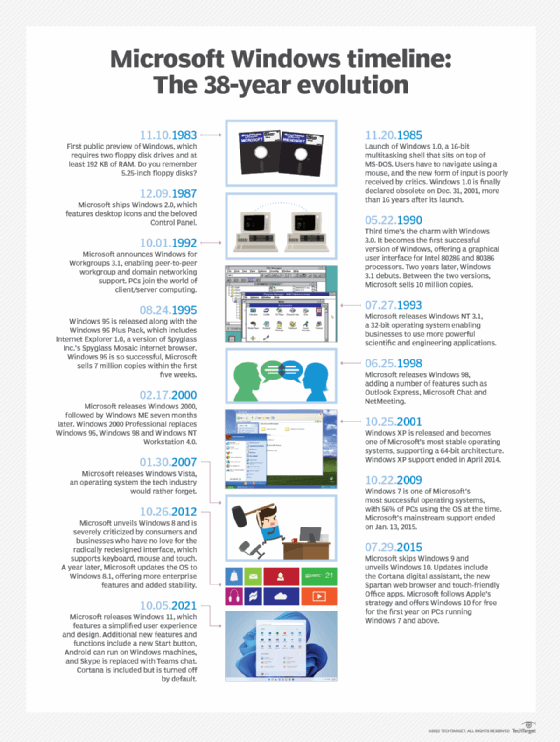
Windows versions through the years
1985: Windows 1.0
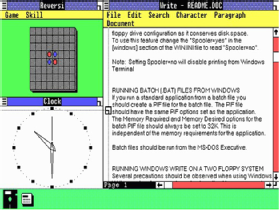
Like many early versions of Microsoft's GUI operating systems, Windows 1.0 was essentially a program that ran on top of DOS. Microsoft did not release the system until two years after its first announcement, leading to suggestions that Windows was vaporware.
The release was a shaky start for the tech giant. Users found the software unstable. However, the point-and-click interface made it easier for new users to operate a computer. The user-friendly nature of Windows also drew interest from customers who might have preferred the easy-to-use start screen over the command-line interface.
Windows 1.0 offered many of the common components found in today's GUI, such as scroll bars and "OK" buttons.
1987: Windows 2.0 and 2.11
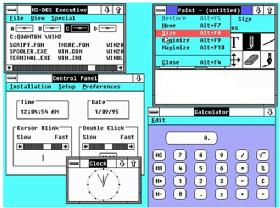
Windows 2.0 was faster, more stable, and had more GUI features in common with the Apple LISA. The system introduced the control panel and ran the first versions of Excel and Word.
Windows 2.0 supported extended memory, and Microsoft updated it for compatibility with Intel's 80386 processor. It was during this time that Microsoft became the largest software vendor in the world, just as computers were becoming more commonplace.
Windows systems becoming more user-friendly and relatively affordable were contributing factors to the growing personal computer (PC) market.
1990: Windows 3.0
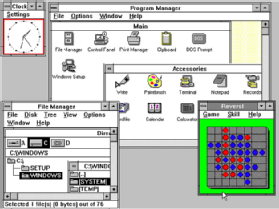
Microsoft optimized the Windows 3.0 OS, which still ran on top of DOS, for the 386 processor for a more responsive system.
Windows 3.0 supported 16 colors and included the casual games familiar to most Windows users: Solitaire, Minesweeper and Hearts. Games that required more processing power still ran directly on MS-DOS.
Exiting to DOS gave games direct hardware access and made more system resources available that otherwise would have gone to Windows. Microsoft offered Windows 3.1 as a paid sub-release in 1993.
Exiting to DOS gave games direct hardware access made more system resources available that otherwise would have gone to Windows. Microsoft offered Windows 3.1 as a paid sub-release in 1993.
Windows 3.1 features included support for TrueType fonts and peer-to-peer networking.
1993: Windows NT

Windows NT's release marked the completion of a side project to build a new, advanced OS. NT was 32-bit and had a hardware abstraction layer.
DOS was available through the command prompt, but it did not run the Windows OS. Microsoft designed NT as a workstation OS for businesses rather than home users. The system introduced the Start button.
1995: Windows 95
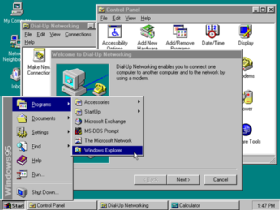
Windows 95 introduced the Windows OS to a wider audience with a marketing campaign that featured The Rolling Stones song "Start Me Up" to celebrate the Start button's arrival to the masses.
Windows 95 facilitated hardware installation with its plug-and-play feature. Microsoft also unveiled 32-bit color depth, enhanced multimedia capabilities, and TCP/IP network support.
1998: Windows 98

Microsoft improved speed and Plug and Play hardware support in Windows 98. The company also debuted USB support and the Quick Launch taskbar in this release.
DOS gaming began to wane as Windows gaming technology improved. The popularity of the OS made it an attractive target for malware. Microsoft integrated web technology into the Windows user interface (UI) and built its own web browser into the desktop. This feature was one of the defining issues in the U.S. Justice Department's antitrust suit against Microsoft in the 1990s.
2000: Windows ME

Windows ME (Millennium Edition) was the last use of the Windows 95 codebase. Its most notable new feature was System Restore. Many customers found this release to be unstable, and it was acknowledged as a poor release by Steve Ballmer and Microsoft. Some critics said ME stood for "mistake edition."
Microsoft released the professional desktop OS Windows 2000 the same year. Microsoft based this OS on the more stable Windows NT code.
Some home users installed Windows 2000 for its greater reliability. Microsoft updated Plug and Play support, which spurred those who used Windows home to switch to this OS.
2001: Windows XP

Microsoft delivered Windows XP as the first NT-based system with a version aimed squarely at the home user. Home users and critics rated XP highly. The system improved Windows appearance with colorful themes and provided a more stable platform.
Microsoft virtually ended gaming in DOS with this release. The DirectX API enabled features in 3D gaming that OpenGL had difficulties with. XP offered the first Windows support for 64-bit computing, but it was not very well supported, lacking drivers and applications to run.
2006: Windows Vista

Microsoft hyped Windows Vista after the company spent a lot of resources to develop a more polished appearance. Vista had interesting visual effects, but the OS was slow to start and run.
The 32-bit version, in particular, didn't enable enough RAM for the memory-hungry OS to operate properly.
Microsoft tightened licensing rights and made it more work to activate Windows. The company also peeled back user control of the operating system's internal workings.
Microsoft lost market share to Apple and Linux variants. Vista's flaws -- coupled with many older computers lacking the resources to run the system -- led to many home and business users staying with XP.
2009: Windows 7

Microsoft built Windows 7 on the Vista kernel. Windows 7 picked up Vista's visual capabilities but featured more stability.
To many users, the biggest changes between Vista and Windows 7 were faster boot times, a new user interface and the addition of Internet Explorer 8. With true 64-bit support and more Direct X features, Windows 7 proved to be a popular release for Windows users.
2012: Windows 8

Microsoft released Windows 8 with numerous enhancements and debuted its tile-based Metro user interface. Windows 8 took better advantage of multicore processing, solid-state drives (SSD), touchscreens and other alternate input methods.
Users found switching from the traditional desktop to the tile-based interface awkward. Even after Microsoft's UI and other updates in 8.1, Windows 8 trailed not just Windows 7 but XP in user numbers into 2014.
2015: Windows 10

Microsoft announced Windows 10 in September 2014, skipping Windows 9. Version 10 includes the Start menu, which was absent from Windows 8.
A responsive design feature called Continuum adapts the interface depending on whether the user works with a touchscreen or a keyboard and mouse for input.
New features like an onscreen back button simplified touch input, while voice-activated Cortana, a virtual desktop assistant, empowered users to multitask. Microsoft designed the OS to have a consistent interface across devices, including PCs, laptops and tablets.
2021: Windows 11
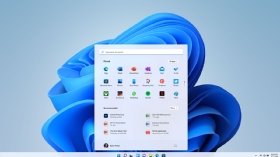
In October 2021, Microsoft released Windows 11, the most recent version of Windows and mobile devices, which is available for free to all Windows 10 users.
This new version, which is still rolling out as of the time of this writing, was designed to be more user-friendly and accessible.
Changes in security
Microsoft did not implement many security methods in its OSes until Windows NT and XP. For example, the default user on a Windows computer received administrator privileges until Vista.
Consumer editions of early versions of Windows did not have security measures built-in since Microsoft designed the OS for single users without network connections. The company integrated security features in Windows NT, but they weren't at the forefront of Microsoft's design. The combination of the lack of security and widespread popularity made Windows systems a target for malicious programs, such as viruses or system exploits.
Microsoft began to release monthly patches every second Tuesday of the month, known as Patch Tuesday, in 2003. Patches to update critical issues may be released on a faster schedule, known as out-of-band patches.
Windows Vista added User Account Control, a privilege evaluation feature based on a token system. The token allowed users only the most basic privileges, such as the ability to execute tasks that might modify system data. When an administrator logged on, they received two tokens -- one that a standard user would receive and another that allowed administrator-level tasks.
Microsoft released its Windows Defender security application as a beta program for Windows XP in 2005. Windows Defender protects systems from spyware threats. Microsoft included Defender in later versions of Windows, such as Windows 10.
Microsoft further buttressed system security with Windows Defender Credential Guard for virtualization-based security, System Guard to protect firmware components and configurations, and Application Guard to protect against malware and hacking threats in the Microsoft Edge browser.
Differences in Windows operating system editions
Starting with Windows XP, Microsoft separated Windows to give different features to distinct audiences. Windows 10, for example, has multiple editions, including Windows 10 Home, Pro and Enterprise editions.
Microsoft makes its consumer OSes for users in an ordinary household setting. The enterprise OS is designed for large organizations in a business setting and tends to have more customization abilities and features that an organization can use, such as security or language packs.
Microsoft designed Windows 10 Home for consumers and tailored it to operate on PCs, tablets and 2-in-1 devices. Microsoft built Windows 10 Pro as a baseline OS for any business, while it developed Windows 10 Enterprise for businesses with higher security needs.
Security features differ among Windows 10 Home, Pro and Enterprise editions. Windows 10 Home includes basic security features such as Windows Defender, Device Encryption and Windows Information Protection.
Windows 10 Pro added more security features such as Bitlocker, Windows Defender Device Guard, Windows Defender Exploit Guard and Windows Defender Antivirus.
Windows 10 Enterprise is identical in features and functionality to the Pro version, but adds more security features such as Windows Defender Credential Guard, Windows Defender Application Guard and Windows Defender Application Control.
Transitioning into Windows 11, the most recent Windows update incorporates many of the same security apps. Instead of requiring them to be turned on manually, however, these features will be on by default in Windows 11.

Windows versus macOS
MacOS is a GUI-based OS developed and owned by Apple. Introduced in 1984, it is the primary OS for Apple computers.
The company released a consumer version in 2001 with macOS X 10.0, which drew praise for its user interface, but criticism for its performance.
After macOS X 10.0, Apple developed newer versions of macOS X from 10.0 to 10.14. Earlier versions were named after big cats, such as Tiger, Puma, Snow Leopard and Mountain Lion. MacOS 10.4.4, or Tiger, was a notable update, which improved performance with graphics processing and file searching.
Later versions of macOS X were then named after California landmarks such as Yosemite, Sierra and Mojave.
Windows versus Linux
Linux is an open source OS built on a Linux kernel. Released in 1991, Linux loads and unloads its kernel at runtime, meaning a user can add software or hardware to a Linux system without rebooting.
Linux is used in consumer and enterprise settings. A well-known consumer-based Linux OS, for example, is Android, which has a large install base on mobile devices. Enterprises can use server versions of Linux for enterprise use, such as virtual machines.